
About the Viper Signals Indicator
The Viper Signals indicator for MT4 is a single-line trend indicator designed to generate straightforward buy and sell signals.
Its clean display makes it suitable for traders who prefer simple decision-making without multiple confirmations.
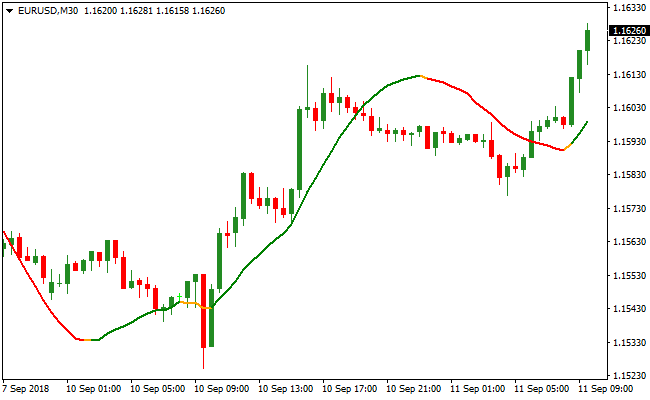
The indicator changes color to reflect market direction.
A green line signals bullish conditions, a red line signals bearish conditions, and an orange line indicates a flat or range-bound market.
For faster strategies, it performs best during the London and New York sessions when liquidity is higher.
The default period is set to 34, but traders can modify this value directly from the inputs tab to adjust sensitivity and signal frequency.
Free Download
Download the “viper-signals.mq4” MT4 indicator
Key Features
- Single-line trend indicator with color-coded signals.
- Green, red, and orange line states for market conditions.
- Performs best during active trading sessions.
- Adjustable period setting for customization.
Indicator Chart
The chart below shows the Viper Signals indicator applied to a live price setup.
The colored signal line reflects the current trend direction.
Green highlights bullish momentum, red highlights bearish momentum, and orange shows consolidation phases.

Guide to Trade with Viper Signals Indicator
Buy Rules
- Monitor the Viper line for a green color, indicating upward momentum.
- Ensure the market is in an active session like London or New York.
- Open a buy position once the green line is confirmed.
- Hold the trade as long as the green line remains active.
Sell Rules
- Wait for the Viper line to turn red, signaling downward momentum.
- Confirm that trading activity is sufficient for execution.
- Open a sell position when the red line is established.
- Remain in the trade until the red line changes or shows weakness.
Stop Loss
- For buy trades, place the stop below the most recent swing low or support level.
- For sell trades, place the stop above the most recent swing high or resistance.
Take Profit
- Close trades when the Viper line changes color.
- Target nearby support or resistance levels for realistic exits.
- Optionally, trail the trade to capture extended trends.
MT4 Strategy: Viper Signals + Best Forex Scalping Indicator Method
This MT4 scalping strategy combines the Viper Signals Indicator and the Best Forex Scalping Indicator to create a fast and efficient method for lower time frame trading.
It works well on M1, M5, and M15 charts where quick movements require clear rules and reliable confirmation.
The strategy focuses on capturing short momentum bursts, making it suitable for traders who enjoy frequent setups and rapid execution.
The Viper Signals Indicator identifies the trend direction by shifting its line from red to green.
A green line indicates bullish conditions while a red line signals bearish pressure.
The Best Forex Scalping Indicator provides the actual entry signals through blue arrows for buy and red arrows for sell.
When an arrow appears in the same direction as the Viper trend, traders get a strong confirmation for a clean and focused scalp.
The simplicity of this combination makes it ideal for both beginners and experienced scalpers.
It eliminates unnecessary noise and focuses only on high probability entries.
Charts remain clean, decision making becomes faster, and trades can be managed with clear rules.
Buy Entry Rules
- The Viper Signals line is green and angled upward.
- A blue arrow appears from the Best Forex Scalping Indicator.
- Price is not pushing into strong resistance from recent highs.
- Place a stop loss below the nearest swing low.
- Take profit at the next intraday resistance or use a fixed 10 to 20 pip target depending on volatility.
Sell Entry Rules
- The Viper Signals line is red and angled downward.
- A red arrow appears from the Best Forex Scalping Indicator.
- Price is not bouncing off a strong support zone.
- Place a stop loss above the nearest swing high.
- Take profit at the next intraday support or use a fixed 10 to 20 pip target.
Advantages
- Simple trend reading through clear color changes.
- Accurate entry timing with arrow signals.
- Clean charts with minimal distraction.
- Works well during high volume market sessions.
- Effective for traders who prefer fast paced setups.
Drawbacks
- Lower time frames can create false signals during low liquidity.
- Trend changes may lag slightly in fast markets.
- Requires discipline to avoid taking every arrow signal.
Case Study 1: EURCAD M5
On EURCAD M5 during the New York session, the Viper Signals line turned green and held steady for several candles.
A blue arrow then appeared from the Best Forex Scalping Indicator.
A buy entry was taken with a stop placed below the recent swing low.
The pair climbed steadily and reached an intraday resistance level, securing a gain of around 16 pips.
The alignment between trend direction and arrow signal created a clean upward scalp.
Case Study 2: GBPCHF M15
GBPCHF showed strong bearish momentum early in the London session.
The Viper line switched to red and sloped downward.
Shortly after, a red arrow confirmed a sell opportunity.
A position was opened with a stop above the previous swing high.
Price continued lower and hit the next support zone for a profit of about 21 pips.
Strategy Tips
- If the Viper line is flat, ignore arrow signals because this usually indicates choppy price action.
- Check nearby support and resistance zones before entering any trade.
- Avoid taking trades just before major news releases as volatility can distort arrow signals.
- For volatile pairs such as GBPJPY, consider slightly larger take profit targets.
- Keep the chart clean and avoid unnecessary indicator stacking to preserve signal clarity.
Download Now
Download the “viper-signals.mq4” Metatrader 4 indicator
FAQ
How do I interpret the Viper Signals line?
Green indicates upward momentum for buy trades, red indicates downward momentum for sell trades, and orange signals consolidation where new trades should be avoided.
Is it suitable for all trading styles?
Yes, it works for scalping, day trading, and swing trading, but session selection is important for faster strategies.
Can I adjust how sensitive the signals are?
Yes, modifying the period in the inputs tab changes the responsiveness of the Viper line to market moves.
Summary
The Viper Signals indicator is a straightforward tool for identifying trend direction using a single color-coded line.
It simplifies trade decisions by clearly showing bullish, bearish, and neutral market conditions.
Its flexibility across multiple trading styles and adjustable settings make it a practical choice for traders seeking clarity and consistent entries.
Using it during active sessions helps maximize the effectiveness of scalping and day trading strategies.





