The Bollinger Bands Squeeze with Demarker forex indicator for MT4 is based on Bollinger Bands together with the Demarker technical indicator.
The indicator oscillates above and below the neutral zero mark level.
Price action above the zero mark level is considered bullish while below bearish.
Use the Bollinger Bands Squeeze with Demarker in conjunction with a trend indicator such as an exponential moving average, ADMI or a simple moving average to create a forex system that works.
First determine the overall trend with the trend following indicator, then use the Bollinger Bands Squeeze with Demarker forex indicator to trade in the direction of the underlying trend.
Overall trend upward? Wait for the oscillator to cross back above the zero mark line from below.
Overall trend downward? Wait for the oscillator to cross back below the zero mark line from above.
All default indicator’s period settings can be fully modified from the inputs settings tab.
Free Download
Download the “bollinger-squeeze-with-demarker.mq4” MT4 indicator
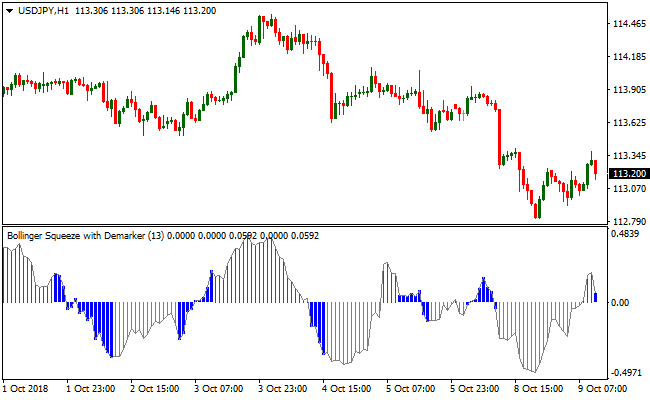
Indicator Chart (USD/JPY H1)
The USD/JPY 1-Hour chart below displays the Bollinger Bands Squeeze with Demarker Metatrader 4 Forex indicator in action.
Basic Trading Signals
Signals from the Bollinger Bands Squeeze with Demarker MT4 forex indicator are easy to interpret and go as follows:
Buy Signal: Open a buy trade position when the oscillator bars cross back above the zero level from below (bullish).
Sell Signal: Open a sell trade position when the oscillator bars cross back below the zero level from above (bearish).
Trade Exit: Use your own method of trade exit.
Bollinger Bands Squeeze with DeMarker + Entry Take Profit Forex Winner MT4 Strategy
This MT4 strategy combines the Bollinger Bands Squeeze with DeMarker Indicator and the Entry Take Profit Forex Winner Indicator to identify high-probability trading opportunities.
By using a trend indicator alongside an oscillator, traders can capture strong trend moves while minimizing false entries.
This strategy works well on H1 and H4 time frames, but it can also be adapted to lower time frames for scalping.
It is suitable for both beginner and experienced traders because it provides clear buy and sell signals, along with defined stop loss and take profit levels.
Buy Entry Rules
- Open a buy trade when the DeMarker oscillator bars cross above the zero level from below, signaling bullish momentum.
- Confirm the trend with the Entry Take Profit Forex Winner Indicator by ensuring a blue arrow appears, indicating an upward trend.
- Set a stop loss below the most recent swing low to limit potential losses.
- Set a take profit at the next resistance level or use the take profit level suggested by the Entry Take Profit Forex Winner Indicator for optimal exit.
Sell Entry Rules
- Open a sell trade when the DeMarker oscillator bars cross below the zero level from above, signaling bearish momentum.
- Confirm the trend with the Entry Take Profit Forex Winner Indicator by ensuring a red arrow appears, indicating a downward trend.
- Set a stop loss above the most recent swing high to protect against sudden reversals.
- Set a take profit at the next support level or use the take profit level suggested by the Entry Take Profit Forex Winner Indicator for maximum gains.
Advantages
- Combines trend confirmation and momentum indicators for high-probability trades.
- Works on multiple time frames from H1 to H4.
- Provides clear entry, stop loss, and take profit rules for consistent trading.
- Helps reduce false signals by using dual confirmation.
Drawbacks
- Requires patience, as trades should only be taken when both indicators confirm the signal.
- Can result in small losses during sideways markets.
- Less effective on very short time frames for inexperienced traders.
Case Study 1
On the EUR/USD H1 chart, the DeMarker oscillator crossed above zero while a blue arrow appeared on the Entry Take Profit Forex Winner Indicator.
A buy trade was opened with a stop loss below the recent swing low.
The trade moved in favor and hit the take profit level at 55 pips, resulting in a clear profit within two trading sessions.
Case Study 2
On the GBP/USD H4 chart, the DeMarker oscillator crossed below zero and a red arrow appeared on the Entry Take Profit Forex Winner Indicator.
A sell trade was executed with a stop loss above the recent swing high.
The price continued downward and reached the take profit level, securing 120 pips.
Strategy Tips
- Always wait for both indicators to confirm the trade to reduce false entries.
- Adjust stop loss and take profit levels according to the volatility of the currency pair.
- Consider using this strategy alongside other risk management tools, such as position sizing and trailing stops.
- Regularly review historical trades to identify patterns and optimize settings for your preferred time frames.
Download Now
Download the “bollinger-squeeze-with-demarker.mq4” Metatrader 4 indicator
MT4 Indicator Characteristics
Currency pairs: Any
Platform: Metatrader 4
Type: Chart pattern indicator
Customization options: Variable (trigger type, stochastic period, cci period, MACD fast, MACD slow, Momentum, Williams R, ADX trigger, Demarker) Colors, width & Style.
Time frames: 1-Minute, 5-Minutes, 15-Minutes, 30-Minutes, 1-Hour, 4-Hours, 1-Day, 1-Week, 1-Month
Type: Bollinger bands