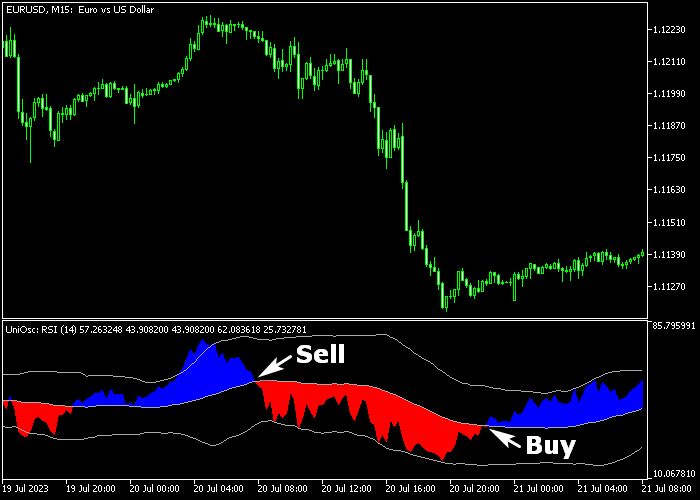
The Universal Forex oscillator for MT5 is a powerful trading tool that generates 100% non-repaint trading signals for all currency pairs.
It’s composed of several technical indicators, including RSI, Bollinger Bands, and Stochastic.
The indicator shows up in a dedicated chart window as blue and red colored clouds.
Trading signals:
- A blue colored cloud generates a buy signal.
- A red colored cloud generates a sell signal.
The following indicator inputs and variables can be modified: RSI period, applied price, draw mode, levels mode, Stochastic settings, and Bollinger Bands settings.
Please understand how the Universal Forex oscillator functions and conduct extensive testing on a demo account before utilizing it in real trading.
Free Download
universaloscillator.mq5 Indicator (MT5)
Trading Chart
The picture below shows what the Universal Forex oscillator looks like when applied to the MT5 chart.
How To Buy And Sell Currency Pairs With The Universal Forex Oscillator?
Find a simple trading example below:
Buy Signal
- A buy signal is given when the blue colored Universal Oscillator cloud is displayed on the chart.
- Initiate a buy transaction and set a stop order below support.
- Exit the buy trade for a fixed pips profit target, for example, +25 pips on the 5-minute chart.
- Alternatively, await a sell signal to close the buy trade.
Sell Signal
- A sell signal is given when the red colored Universal Oscillator cloud is displayed on the chart.
- Initiate a sell transaction and set a stop order above resistance.
- Exit the sell trade for a fixed pips profit target, for example, +40 pips on the 30-minute chart.
- Alternatively, await a buy signal to close the sell trade.




